1. Why InDesign Is the Industry Standard
Adobe InDesign is widely used in publishing because it offers:
- Precise layout control
- Professional typography
- Master pages for consistent design
- Support for images, tables, and complex formatting
- Export options optimized for print and digital publishing
2. Basic Workflow for Creating a PDF in InDesign
Step 1: Set Up the Document
Choose:
- Page size (A4, Letter, Journal size)
- Margins and bleed
- Columns and grids
Step 2: Create Master Pages
Master pages ensure consistent headers, footers, page numbers, and branding across the entire publication.
Step 3: Add Text and Graphics
Import:
- Manuscript text
- Figures and tables
- Logos and design elements
Use paragraph and character styles for consistent formatting.
Step 4: Apply Typography Rules
InDesign allows fine control over:
- Kerning
- Leading
- Hyphenation
- Justification
This ensures professional readability.
Step 5: Export as PDF
Choose between:
- PDF (Print) for high‑resolution printing
- PDF (Interactive) for digital reading, hyperlinks, and bookmarks
Set compression, color profiles, and bleed settings as needed.
Editing PDF Files in Adobe Acrobat
1. Why Acrobat Is Essential
Adobe Acrobat is designed for:
- Reviewing and annotating PDFs
- Making corrections
- Adding comments
- Editing text and images
- Preparing files for publication
2. Common Editing Tasks in Acrobat
1. Edit Text
You can modify text directly in the PDF:
- Fix typos
- Adjust spacing
- Replace words or sentences
2. Edit Images
Acrobat allows:
- Replacing images
- Cropping
- Resizing
- Adjusting placement
3. Add Comments and Annotations
Useful for peer review and editorial workflows:
- Sticky notes
- Highlights
- Underlines
- Drawing tools
4. Combine or Split PDFs
Acrobat can merge multiple files or split a large PDF into smaller sections.
5. Add Security
You can:
- Password‑protect PDFs
- Restrict printing or copying
- Add digital signatures
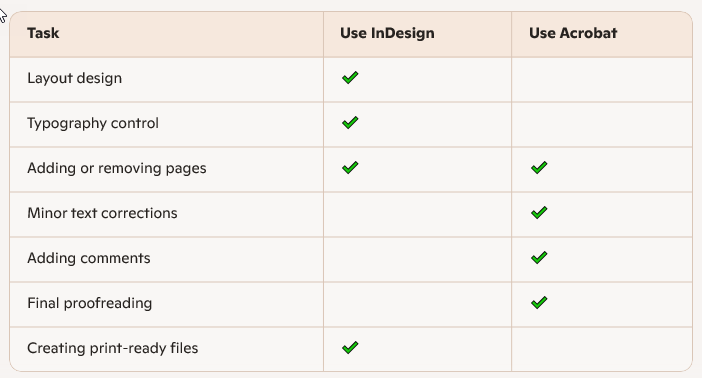
3. When to Use InDesign vs. Acrobat
Conclusion
InDesign and Acrobat work together to create professional, high‑quality PDFs. InDesign handles the design and layout, while Acrobat is ideal for reviewing, correcting, and finalizing the document. For publishers, mastering both tools ensures efficient production and polished results.